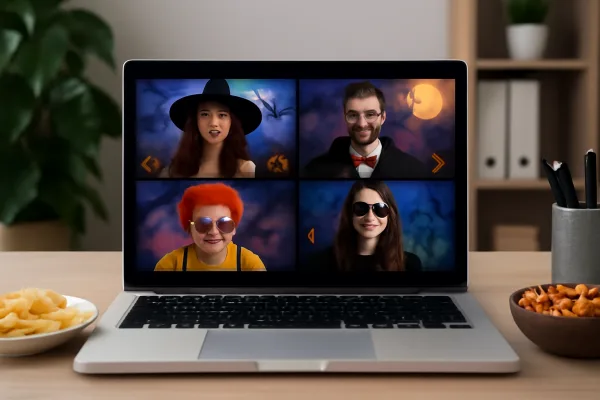
Virtual murder mystery parties proved their worth during the pandemic lockdowns of 2020-2021, when millions of people discovered that the thrill of solving a mystery with friends translates surprisingly well to video chat. But far from being a temporary substitute for in-person events, virtual murder mysteries have evolved into a legitimate entertainment format with dedicated platforms, professional facilitators, and production values that rival their physical counterparts. Whether you are connecting with long-distance friends, organizing a remote team building event, or simply prefer the convenience of playing from your couch, virtual murder mystery parties offer an experience that is engaging, accessible, and genuinely fun.
According to event platform Eventbrite, virtual murder mystery events saw a 1,200% increase in listings between 2019 and 2021, and while that number has moderated since in-person events resumed, virtual mystery events maintain approximately 340% higher listing volumes than pre-pandemic levels. The format has found a permanent audience among distributed friend groups, remote work teams, and people who appreciate the logistical simplicity of a party that requires nothing more than an internet connection and a willingness to play.
This complete guide covers everything you need to host or join a virtual murder mystery party: the best platforms and providers, technical setup tips, hosting strategies that keep remote players engaged, and solutions to the common challenges that can undermine virtual events.
Choosing Your Virtual Murder Mystery Format
Virtual murder mystery parties come in several formats, each with distinct advantages and ideal use cases. Understanding these formats helps you choose the right experience for your specific group.
| Format | Players | Cost | Host Effort | Best For | Tech Required |
|---|---|---|---|---|---|
| Self-hosted with digital script | 6-20 | $25-50 for script | High | Groups with an experienced host; budget-friendly | Video chat + email |
| Professionally facilitated | 10-100+ | $200-2,000+ | Very Low | Corporate events, large groups, special occasions | Video chat provided |
| App-based interactive | 4-12 | Free-$15 | Low | Casual groups, spontaneous events | Smartphone + video chat |
| Hybrid (in-person + remote) | 6-30 | $25-100 | Medium-High | Groups with some local and some remote members | Camera, speaker, video chat |
Self-Hosted with Digital Script
This is the most popular format for friend groups. You purchase a digital mystery script from a provider, email character packets to each player before the event, and host the game over Zoom or another video platform. The host manages the evening’s flow, distributes clues at the appropriate times, and facilitates discussions.
Best providers for virtual-ready scripts:
- Red Herring Games: Specifically designs mysteries for virtual play with digital-ready character packets and a virtual host guide. Mysteries range from 6 to 20 players. Price: $25 to $40.
- My Mystery Party: Many of their 200+ mysteries include virtual play instructions. Character packets can be emailed as PDFs. Price: $25 to $45.
- Night of Mystery: Offers “virtual party packs” with digital invitations, emailable character info, and a virtual host timeline. Price: $30 to $50.
- Freeform Games: Their interactive format translates particularly well to virtual play because characters drive the action independently. Price: $29 to $49.
Professionally Facilitated
For corporate events, milestone celebrations, or groups who want a premium experience without the hosting effort, professional murder mystery companies offer fully facilitated virtual events. Professional actors play key roles, a trained facilitator manages the entire evening, and all technical production is handled by the provider.
Notable providers:
- The Murder Mystery Co.: One of the largest providers, offering virtual events for 10 to 500+ participants with professional actors and facilitators. Corporate packages include team-building elements.
- Outback Team Building: Specializes in corporate virtual murder mysteries with team competition elements and professionally produced video content.
- TeamBonding: Offers virtual mystery events designed specifically for corporate team building with customizable difficulty and team sizes.
Professional events typically cost $20 to $50 per person for corporate packages and $200 to $500 for private group events. The premium price buys professional production quality, zero host preparation, and the confidence that the event will run smoothly regardless of the group’s experience level.
Technical Setup for a Smooth Virtual Mystery
Technical issues are the number one killer of virtual event energy. A few minutes of preparation prevents the most common problems and ensures a smooth experience for all participants.
Video platform selection: You might also enjoy our guide on in-person murder mystery parties.
| Platform | Best Feature for Mystery | Max Free Participants | Breakout Rooms? | Cost |
|---|---|---|---|---|
| Zoom | Breakout rooms for private conversations | 100 (40-min limit on free) | Yes | Free / $13.33/mo Pro |
| Google Meet | Simple, no download required | 100 | Yes (paid plans) | Free / $6/mo |
| Discord | Multiple voice channels for investigation | Unlimited | Via voice channels | Free |
| Microsoft Teams | Corporate integration | 100 | Yes | Free / included with M365 |
Zoom is the recommended platform because its breakout room feature is essential for murder mystery parties. Breakout rooms allow players to have private conversations during investigation phases, replicating the sidebar discussions that happen naturally at in-person events. Without breakout rooms, the entire mystery becomes a single group discussion, which reduces the strategic and social elements significantly.
Pre-event technical checklist (send to all participants 48 hours before):
- Test your camera and microphone. Use headphones with a built-in microphone to prevent echo and feedback.
- Ensure a stable internet connection. Wired ethernet is more reliable than WiFi. If using WiFi, sit close to the router.
- Set up your background. Either use a virtual background matching the mystery’s theme or ensure your physical background is tidy and well-lit.
- Download and test the video platform in advance. Do not wait until the event starts to discover that your Zoom needs an update.
- Have your character packet accessible on screen or printed. Being able to reference your character information quickly is essential during discussions.
- Charge your device fully or keep it plugged in. A dying battery mid-mystery is a disaster.
Hosting Strategies That Keep Virtual Players Engaged
The biggest challenge of virtual murder mystery parties is maintaining engagement through a screen. In-person events benefit from physical proximity, body language, costume immersion, and the natural energy of a shared space. Virtual events must compensate for these missing elements through deliberate hosting strategies.
Keep rounds shorter. Screen fatigue sets in faster than in-person fatigue. Reduce discussion rounds from 15 to 20 minutes (typical for in-person) to 8 to 12 minutes for virtual play. Shorter rounds maintain urgency and prevent the energy dips that kill virtual events. If the mystery has 4 rounds in person, consider condensing to 3 rounds for virtual play.
Use the chat function for clue delivery. Instead of emailing clue packets between rounds (which creates awkward transition periods), use the video platform’s direct message feature to send clue text to individual players in real time. This creates seamless transitions and the feeling of receiving a secret message, which adds to the mystery atmosphere.
Enforce cameras-on. Being able to see other players’ facial reactions, costumes, and body language is essential for the social deduction element. Politely but firmly establish cameras-on as a ground rule at the beginning of the event. Players who are not visible on camera are significantly less engaged and less engaging.
Build in social breaks. Include a 10-minute break halfway through the event for bathroom visits, drink refills, and casual conversation. This break prevents fatigue and gives players a chance to discuss theories informally before the formal investigation resumes.
Use visual aids. Share your screen to display suspect photos, evidence images, or a timeline of events at key moments during the mystery. Visual elements break up the monotony of talking heads and provide focal points that keep attention centered on the investigation.
“The secret to a great virtual murder mystery is pacing. Keep it tight, keep it moving, and never let the energy drop. A 90-minute virtual mystery with excellent pacing will outperform a 3-hour in-person mystery with poor pacing every time.” — Virtual Events Pro, LinkedIn article
Costumes and Atmosphere in a Virtual Setting
Costumes might seem less important for virtual events, but they actually serve a more critical function online than in person. On a video call, where every participant appears as a small rectangle on a screen, a distinctive costume immediately identifies each character and creates visual interest that prevents the event from feeling like just another Zoom meeting. For additional reading, visit Among Us.
Encourage participants to dress in character, even if it is just a hat, a scarf, or a themed accessory visible on camera. The effort of putting on a costume creates psychological commitment to the roleplay, and the visual variety makes the group call feel more like an event and less like a meeting.
Virtual background themes: Provide a themed virtual background image to all participants before the event. A 1920s speakeasy backdrop, a Victorian drawing room, or a tropical island scene creates instant atmosphere at zero cost. Most video platforms support custom virtual backgrounds, and a consistent background across all participants creates visual cohesion that enhances immersion.
Lighting for atmosphere: Suggest that participants use warm, slightly dim lighting rather than harsh overhead lights. A desk lamp or ring light positioned to one side creates flattering, atmospheric lighting that enhances the mystery mood. For gothic or horror themes, LED color-changing bulbs set to red or purple create dramatic effects visible on camera.
Solving Common Virtual Mystery Challenges
Challenge: People talking over each other. Establish a speaking protocol at the beginning. Options include raising a virtual hand before speaking, using a talking-stick item held up to the camera, or the host calling on speakers in rotation. For investigation discussions, breakout rooms of 3 to 4 players prevent the chaos of a full-group free-for-all.
Challenge: Players multitasking or disengaging. Keep rounds short, call on quiet players by name to share their theories, and use direct questions rather than open-ended prompts. If engagement drops, announce a surprise clue or an unexpected twist to recapture attention. The host’s energy is the single biggest factor in maintaining group engagement.
Challenge: Technical issues mid-event. Designate a co-host who can manage technical troubleshooting while you continue hosting the mystery. Have a backup communication channel (group text or WhatsApp) for players who get disconnected. Include a brief troubleshooting pause at the beginning where everyone tests their audio and video before the mystery starts.
Challenge: Time zone differences. For international groups, choose an event time that falls within reasonable hours for all participants. Saturday or Sunday afternoon in the host’s time zone often works best for groups spanning multiple time zones. Consider the event duration carefully — a 2-hour event that starts at 8 PM for some participants means midnight for others.
Challenge: Maintaining the mystery across digital communication. Remind participants not to discuss the mystery in group chats, social media, or any digital channel outside the event. Post-event discussion is fine, but sharing clue information or theories between sessions (for multi-session mysteries) spoils the experience. Establish this ground rule clearly at the beginning. For more on this topic, check out our article about corporate mystery events.
Virtual Murder Mystery for Corporate Team Building
Virtual murder mystery events have become one of the most requested corporate team building activities for remote and hybrid teams. The format naturally develops skills that organizations value: communication, collaboration, analytical thinking, and the ability to build trust with colleagues you may never meet in person.
Why companies choose virtual murder mysteries:
- They engage 100% of participants (unlike passive virtual events like webinars or presentations)
- They require genuine collaboration and communication to succeed
- They reveal leadership styles, communication preferences, and problem-solving approaches in a low-stakes environment
- They create shared memories and inside jokes that strengthen team culture
- They accommodate remote, hybrid, and international teams on a single platform
Structuring a corporate virtual mystery: Corporate events benefit from a slightly different structure than friend-group events. Begin with a 5-minute icebreaker activity that gets everyone talking and comfortable on camera. Keep the mystery itself to 60 to 90 minutes (corporate attention spans for non-work activities are shorter than social attention spans). Include a 15-minute debrief after the reveal where teams discuss what they learned about their communication and collaboration patterns. End with informal socializing time for those who want to stay.
Budget for corporate events: DIY virtual mysteries using purchased scripts cost $25 to $50 plus the host’s time. Professionally facilitated events range from $500 to $2,500 depending on group size and customization level. For teams of 20+, professional facilitation is strongly recommended because managing a large group on a video call while also running the mystery is extremely challenging for a non-professional host.
Conclusion
Virtual murder mystery parties are not a compromise — they are a legitimate and increasingly polished entertainment format that offers unique advantages over in-person events: the ability to include friends and colleagues from anywhere in the world, the elimination of venue costs and travel logistics, and the surprising intimacy that video chat provides for focused social interaction. The key to success is the same as any murder mystery party: a good mystery, an energetic host, and a group of participants who are willing to embrace the roleplay.
Whether you are hosting your first virtual mystery or your fifteenth, the strategies in this guide will help you create an event that is engaging, memorable, and genuinely fun for everyone who logs on. The mystery is waiting. All you need is a video call and a willingness to play.
Found this helpful? Share it with your remote friend group or work team.
Frequently Asked Questions
How long should a virtual murder mystery last?
90 minutes to 2 hours is the sweet spot for most virtual murder mystery events. Shorter events (60-90 minutes) work better for corporate settings and casual groups. Longer events (2-3 hours) work for dedicated friend groups and events with built-in social breaks. Avoid exceeding 2.5 hours, as screen fatigue diminishes the experience beyond that point. Learn more at Zoom.
What is the ideal group size for a virtual murder mystery?
8 to 14 participants is the sweet spot. Fewer than 8 limits the mystery’s complexity and character variety. More than 14 makes group discussion chaotic on video chat. For larger groups, professional facilitation with structured breakout rooms can accommodate 20 to 100+ participants effectively.
Can I host a virtual murder mystery for free?
Yes. Free mystery scripts are available online (PlayingWithMurder.com, Reddit communities), and free video platforms like Zoom (40-minute limit on free tier), Google Meet, and Discord provide the technical infrastructure. The total cost can be zero if you use free scripts and a free video platform.
Do guests need to dress up for a virtual murder mystery?
Costumes are not required but are strongly encouraged. Even a simple hat, scarf, or themed accessory creates visual interest on camera and signals that the event is something special. Provide specific, easy costume suggestions with the character packets to make participation easy.
What if someone has a bad internet connection during the event?
Have a backup plan: share the group’s phone number or a WhatsApp group so disconnected players can follow along via text. Assign a buddy to each player with known connection issues who can relay information if they drop out temporarily. For critical moments (clue reveals, accusations, voting), wait for all participants to be connected before proceeding.
Hybrid Murder Mystery Events: Bridging In-Person and Remote
Hybrid events, where some participants are physically present and others join remotely, represent the next evolution of murder mystery parties. This format accommodates the reality of modern social circles where friends and family live in different cities, states, or countries. Running a successful hybrid murder mystery requires additional planning but creates an inclusive experience that neither purely in-person nor purely virtual events can match.
Technical setup for hybrid events: The physical location needs a camera that captures the in-person group (a laptop webcam, a dedicated webcam on a tripod, or a smartphone on a stand), a large screen or projector that displays the remote participants so in-person guests can see them, and a quality microphone that picks up conversation from the in-person group without feedback. A dedicated speaker ensures remote voices are audible to the physical group. Conference-quality speakerphones or a simple Bluetooth speaker connected to the hosting laptop handle this well for groups under 15.
Equalizing the experience: The biggest challenge of hybrid events is ensuring that remote participants feel equally included. Remote players tend to be overlooked during fast-paced in-person discussions, and physical group dynamics can inadvertently exclude virtual attendees. Solutions include designating an in-person liaison whose job is to ensure remote players are heard during discussions, using the chat feature as a secondary communication channel for remote players, and structuring investigation rounds so that remote and in-person players have equal access to clues and equal speaking time.
Clue distribution in hybrid format: In-person players can receive physical clue envelopes while remote players receive digital clues via direct message or email. For fairness, distribute all clues simultaneously so no group has an information advantage. Some hosts create sealed physical envelopes for in-person players and use the platform’s direct message to deliver identical content to remote players at the same moment. We also have a great resource on Among Us strategy guide that you might find helpful.
The accusation phase: During the final accusation and voting, ensure all players, both in-person and remote, cast their votes simultaneously. Use a countdown system where the host counts to three and everyone reveals their accusation at the same time. This prevents in-person players from being influenced by remote votes or vice versa, and it preserves the dramatic simultaneous reveal that makes murder mystery endings so exciting.
Hybrid events require more setup than pure in-person or pure virtual events, but the ability to include everyone in your social circle regardless of geography makes the extra effort worthwhile. As hybrid event technology continues to improve and become more accessible, this format will likely become the default for groups with geographically distributed members who want to share the murder mystery experience together.
Measuring Success: How to Know Your Virtual Mystery Hit the Mark
After hosting a virtual murder mystery, take a few minutes to evaluate its success. This reflection helps you improve future events and identify what resonated most with your specific group.
Engagement indicators: Did participants stay on camera throughout the event? Did they participate actively in discussions? Were breakout room conversations lively? Did anyone voluntarily extend the event past the planned end time? These behavioral indicators are more reliable measures of engagement than post-event feedback because they reflect real-time choices rather than polite after-the-fact assessments.
Social indicators: Did participants discuss the mystery afterward in group chats or social media? Did anyone ask when the next one will be? Did the event generate inside jokes or references that persisted in the days following? These social ripple effects indicate that the event created genuine shared memories rather than just filling a time slot.
Practical improvements: Note any technical issues, pacing problems, or moments where engagement visibly dropped. Were rounds too long or too short? Was the mystery too easy or too difficult? Were breakout rooms used effectively? These practical observations become the foundation for your next event’s planning, creating a continuous improvement cycle that makes each virtual mystery better than the last.
The most successful virtual murder mystery hosts treat each event as both entertainment and an iterative learning experience. By consistently evaluating what works, adapting what does not, and building on the elements that generate the strongest engagement, you develop hosting skills that make every subsequent event smoother, more engaging, and more memorable for everyone involved.